Live shader design app launch
A shader app launch animation: a cursor drags sliders and clicks presets, reshaping one live shader. Copy the prompt into Claude and make it your own.
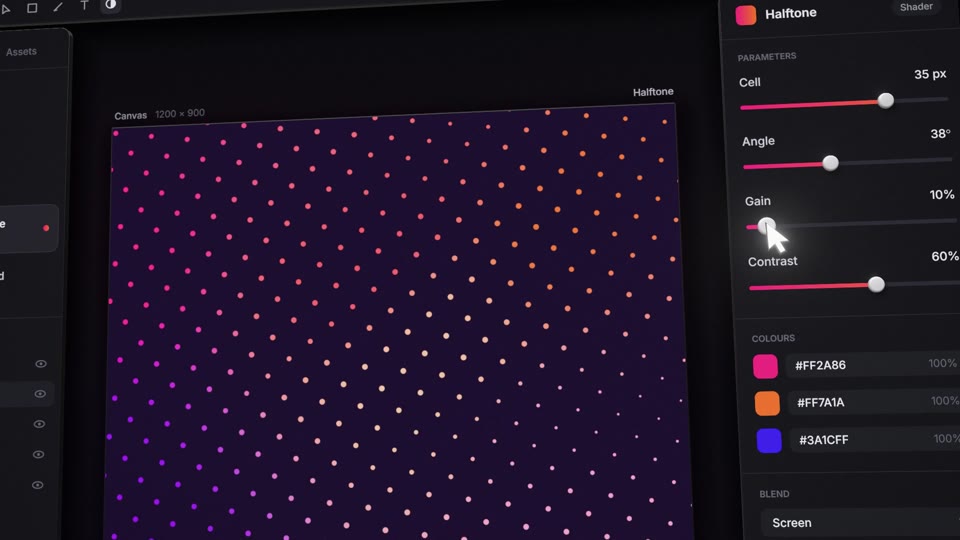
A dark design app floats in space. Its top bar and two side cards fly in with a slight overshoot, then a 3D cursor drags real slider knobs and clicks presets. Each move reshapes one live shader: liquid gradient, mesh gradient, halftone dots, starfield. The camera then pushes into the canvas, the stars streak into warp, and a logo mark assembles.
Change the brand name, tagline, the file name in the top bar, all four preset names and the three colours (magenta, orange, indigo). It is 16:9 at 20 seconds, so it suits a product launch on YouTube, a landing page hero, or an X announcement. Ask Claude for new words or colours, then render the MP4 locally.
Use it for
- Design tool launch video
- Landing page hero loop
- Shader app announcement clip
Specs
- Length: 20 seconds
- Format: widescreen 16:9 (1920x1080), 30 fps
- Built with: Three.js in HyperFrames
- Category: App UI
What happens, beat by beat
- 0.0 s: hook. The camera starts inside the canvas, rolled about 8 degrees, frame full of warm liquid gradient.
- 1.0 / 1.5 / 2.0 s: top bar, left card, right card fly in (from above, left, right, each from 0.9 units out in depth) with a back-out overshoot; the camera pulls to a wide three-quarter…
- 2.5 to 3.5 s: cursor drags [param 1, e.g. Warp] from 0.46 to 0.84: the liquid folds tighter.
- 4.0 to 5.0 s: drags [Ink] down to 14%: black drains away, colour floods in.
- 6.0 s: clicks preset 2 [e.g. Mesh]: the liquid un-warps into a mesh gradient as a ripple spreading from the click side; parameter rows swap out and in, staggered.
- 7.0 to 8.0 s: [Softness] to 0.85, cell edges stop curling.
- 9.0 s: clicks preset 3 [e.g. Halftone]: dots open from the centre outward.
- 10 to 13 s: three quick drags: [Cell] to big dots, [Angle] to 38 degrees (the grid turns), [Gain] to 10% (dots shrink to pin points).
- 13.5 s: clicks preset 4 [e.g. Starfield]: the pin points jitter off the grid and become stars, a match on shape.
- 14.5 to 15.5 s: drags the starfield [Warp] to max: radial streaks; camera begins its push.
One shader, five looks
- Liquid: an iterated sine domain warp (five octaves) feeding a partly triangle-wave band function, mapped through a ramp ink, indigo, magenta, orange, hot cream. Finite-difference normals give it a lit…
- Mesh: six drifting colour points blended by inverse distance raised to a softness exponent, wobbled edges, fine grain. It blends in from the click point outward, and the liquid's warp…
- Halftone: a rotated grid whose dot radius is driven by the liquid field and coloured by the mesh; anti-aliased with fwidth, sub-pixel dots dim instead of sparkling.
- Starfield: seven depth layers flying toward the lens, radial streaks whose length grows with warp and tapers toward the centre. Travel is the integral of warp speed, precomputed into a…
- Logo: a rounded triangle split into three facets, each a window onto its own slice of the liquid ramp, scaling in with a back-out ease. Wordmark (Outfit 600) and tagline…
What you can change
- [Brand], [tagline], [file name], [preset names], and [colour A, e.g. magenta #ff2a86], [colour B, e.g. orange #ff7a1a], [colour C, e.g. indigo #3a1cff], all as composition…
How the prompt opens
Make a silent 20-second, 16:9 (1920x1080, 30 fps) launch film for [your creative tool, e.g. a shader app called "Prism"]. A dark design app is built as a physical object floating in space: glass-dark cards, real slider knobs and a 3D cursor, all lit by the canvas in the middle. The cursor drags sliders and clicks presets, and each move visibly reshapes one live GLSL shader: liquid gradient, mesh gradient, halftone dots, starfield. Then the camera pushes into the canvas, the stars streak into warp and slow, and the logo mark assembles out of the vanishing point with [your brand name] and [your tagline, e.g. "Shaders, live on the canvas."]. Swap in your own names, numbers and three colours.
The full prompt runs 1,100 words. Copy it free (2 a day) from this page.
Copy the prompt into Claude, or pull the scene into Claude Code and render the MP4 on your machine: how it works.