Spark-driven computer boot sequence
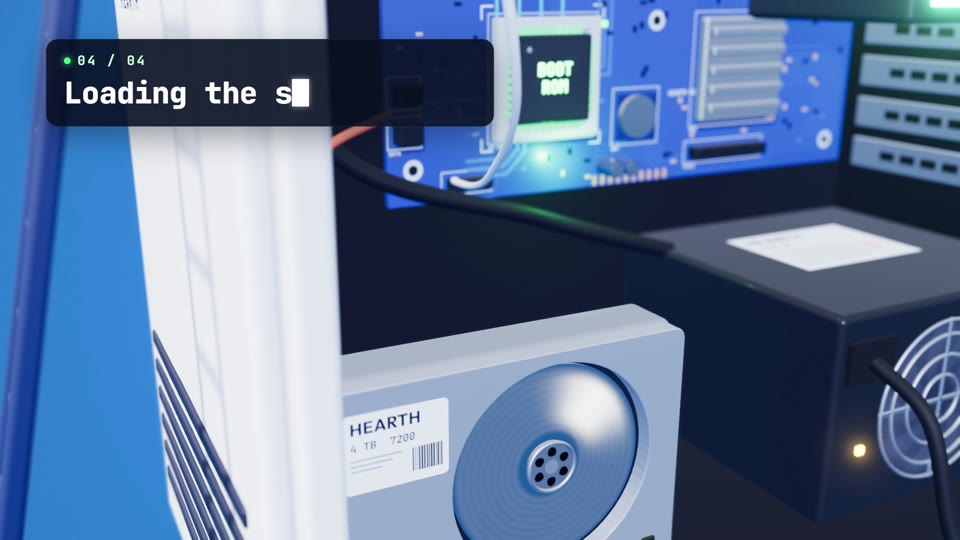
Isometric computer boot sequence animation: a spark runs through switch, power supply, chip, memory and CPU to a monitor. Copy it into Claude and render.
A small crew in white caps powers up a cut-open white computer tower on a bright blue field. A title types and erases, vans arrive, and a knife switch slams down. One spark then hops through the power supply, chip, memory, CPU and disk, and out along a cable to a monitor.
Edit the typed title, brand name, four step captions, chip text, memory count and closing line, plus the blue, glow and navy colours. It fits 30-second explainers on how computers start, hardware launches, onboarding videos and 16:9 YouTube or website slots.
Use it for
- How computers boot explainer
- Hardware brand launch video
- Tech onboarding walkthrough
Category: Explainers. Format: widescreen 16:9.
How to use this scene in Claude
Copy the scene's prompt into claude.ai or the Claude app and Claude builds it as a live preview. For an MP4, pull the scene into Claude Code and render it on your own machine with npx hyperframes render. Or add the Scenes connector (https://scenes.design/mcp) to Claude and just ask for the scene. Full steps: Docs.